News & updates · · SharePoint Best Practices, Intranet Optimization, Intranet User Experience, Mega Menu Design, SharePoint Navigation
Transform SharePoint with LightPath Intranet – Why SharePoint navigation needs an upgrade
SharePoint is a powerhouse for enterprise collaboration, but it’s overdue for a SharePoint navigation upgrade. Too often, employees get lost in deep folder structures, struggling to find key resources. And when users can’t find what they need, productivity takes a hit.
That’s where LightPath Intranet comes in. Imagine a modern SharePoint intranet that’s easy to navigate, beautifully branded, and structured in a way that actually makes sense. Whether you’re an HR leader managing policies, an IT admin overseeing digital assets, or an employee just trying to find last quarter’s sales report, LightPath Intranet ensures you get where you need to go—fast.
Why You Need a SharePoint Navigation Upgrade
If you’re looking to transform SharePoint with LightPath, the need usually starts with navigation. Native SharePoint navigation can quickly become cluttered, making the user experience frustrating and inefficient. A streamlined approach through a solution like LightPath enables organizations to modernize their intranet experience, improve usability, and align design with brand identity.
The Challenges with Native SharePoint Navigation
-
Complex Navigation: SharePoint’s default navigation is cumbersome, often requiring multiple clicks to access important resources. Employees waste time searching instead of working.
-
Difficult-to-Manage Personalization: While SharePoint does allow for personalized navigation, it can be challenging for administrators to configure and maintain at scale.
-
Limited Branding Options: Organizations struggle to align SharePoint’s look and feel with their corporate identity, resulting in a disconnected user experience.
-
No Built-in Analytics: There’s no easy way to track how employees interact with the intranet, making it difficult to optimize content placement.
How LightPath Enhances SharePoint Navigation
-
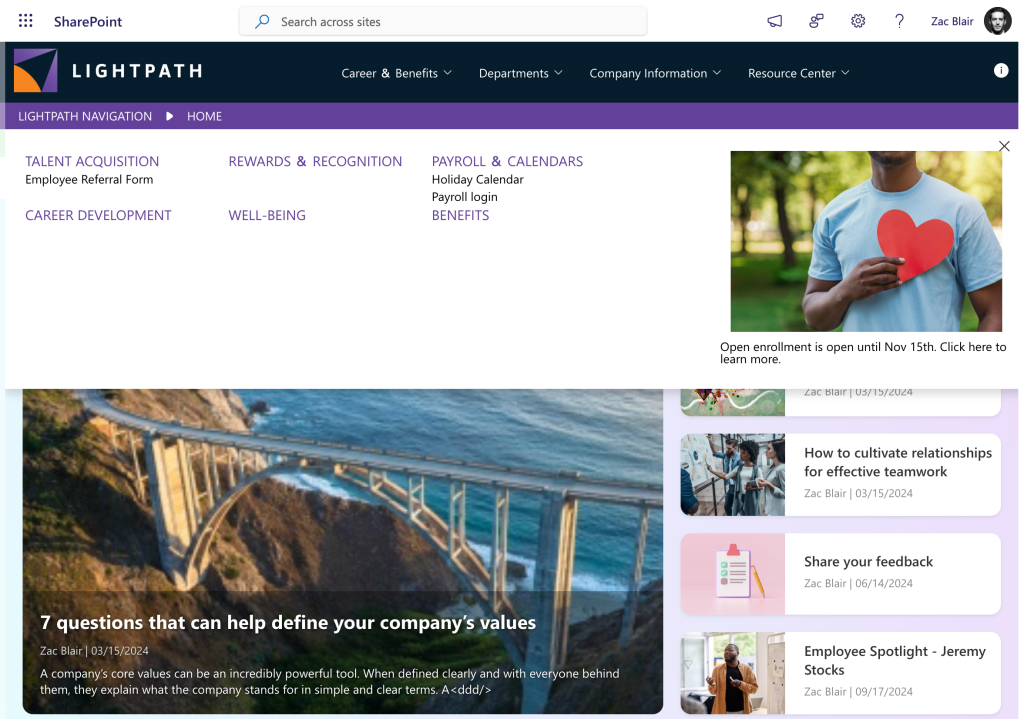
Mega Menu & Breadcrumbs: Employees can quickly find what they need with a structured mega menu and contextual breadcrumbs that guide them.
-
Simplified Audience-Based Navigation: IT teams can easily configure dynamic menus that show different options based on job roles, locations, and departments—without the complexity of SharePoint’s default tools.
-
Branded Experience: Organizations can fully customize colors, fonts, and layouts, ensuring SharePoint aligns with their corporate identity.
-
Analytics Integration: Google Analytics, Matomo, and Microsoft Clarity provide deep insights into user behavior, helping administrators optimize the intranet experience.
If your organization is seeking a LightPath SharePoint enhancement that aligns with your brand and helps employees find what they need faster, these features directly address the limitations of native SharePoint.
Organizations across industries are realizing that a SharePoint navigation upgrade is critical for improving intranet usability and reducing IT overhead.
Success Story: A Finance Firm Cuts IT Support Requests by 80%
A large financial services company with over 5,000 employees across North America was struggling with its SharePoint intranet. Employees frequently contacted IT for help finding compliance documents, HR policies, and department-specific resources. According to the IT helpdesk, nearly 30% of all support tickets were related to intranet navigation issues, such as employees not knowing where to find essential forms or getting lost within disconnected SharePoint sites.
To address this challenge, the company decided to transform SharePoint with LightPath. By implementing LightPath’s mega menu and audience-based navigation, employees could instantly access the most relevant resources for their department, reducing the need to search through multiple sub-sites. Additionally, the IT team used LightPath’s analytics integration to track intranet usage, further refining navigation based on employee behavior.
Within six months, the company saw an 80% reduction in IT support requests related to intranet navigation. Employees could now self-serve more efficiently, freeing IT teams to focus on strategic initiatives instead of answering repetitive support tickets.
If your team is tired of confusing menus and scattered links, it’s time for a SharePoint navigation upgrade powered by LightPath.
Take Control of Your SharePoint Intranet
LightPath SharePoint enhancement tools bridge the gaps in navigation, branding, and personalization—creating a better experience for everyone. Whether you’re launching a new intranet or modernizing an existing one, now is the time to transform SharePoint with LightPath and deliver a more intuitive, engaging, and modern SharePoint intranet for your organization.